Translation in Drupal: symmetric or asymmetric, how to choose
· 9 min read

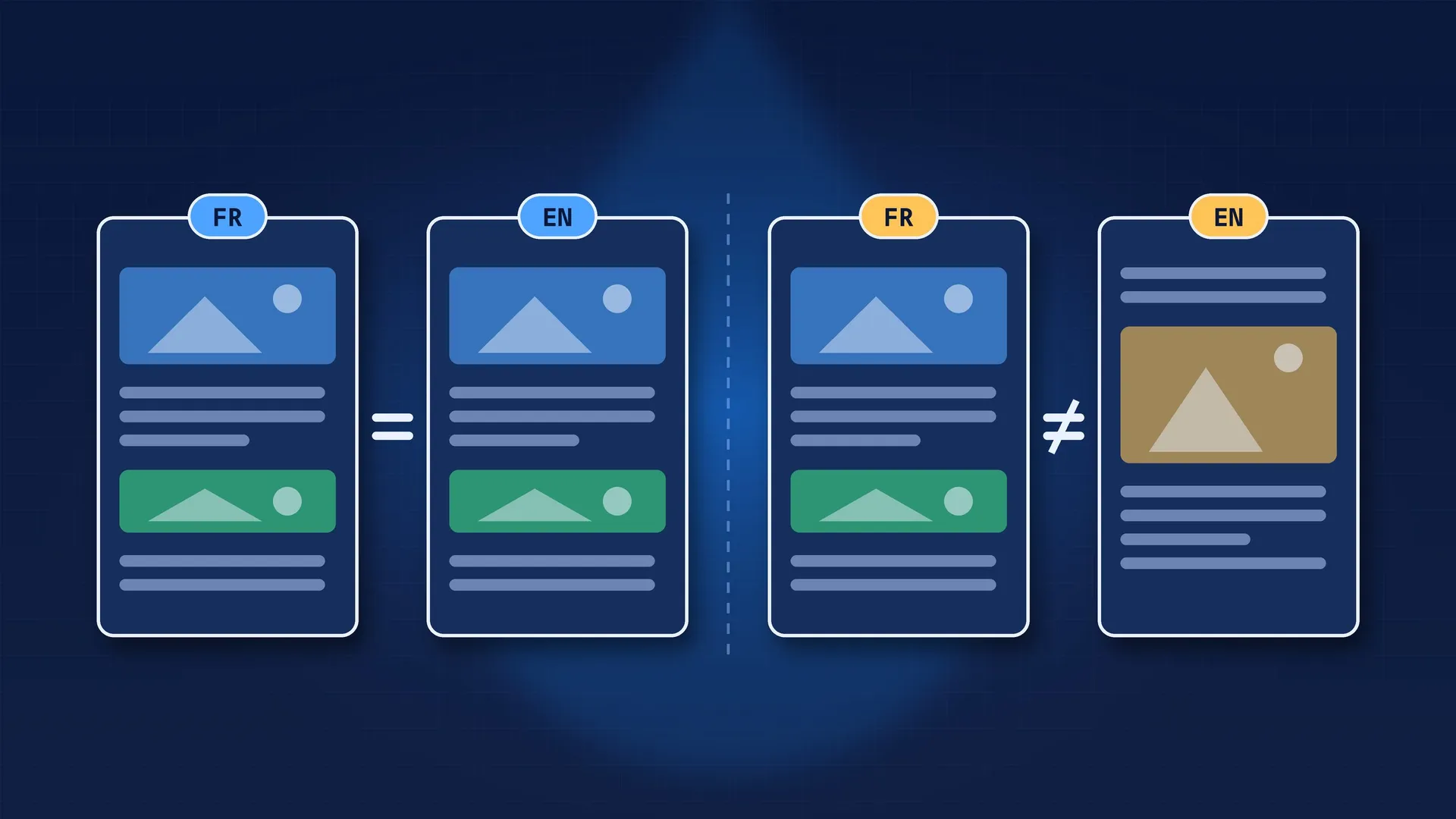
On a multilingual site, the first question people ask is “which languages?”. The question that should come right after, and that’s almost always forgotten, is: does the English version of a page have the same structure as the French one?
The answer drives the field configuration, the choice of layout modules, the translators’ workflow and the amount of work every change takes. And it’s very expensive to change once the site is full of content.
There are two models:
This article explains how Drupal implements both models, how they play out with Paragraphs, Layout Builder and Drupal Canvas, and how to choose.
| Symmetric | Asymmetric | |
|---|---|---|
| Page structure | Identical in every language | Specific to each language |
| Adding a section | In the original language, it appears everywhere | In one language, without touching the others |
| Translator’s job | Translate text | Translate and build the page |
| Consistency across languages | Guaranteed | Up to the teams |
| Translation tools (TMGMT, agencies) | A great fit | Harder to industrialize |
| Typical case | Corporate site translated one-to-one | Country sites with local teams |
Neither is better in absolute terms. Symmetric guarantees consistency and simplifies translation. Asymmetric gives local teams freedom, at the cost of heavier maintenance.
In Drupal, a translation isn’t a separate entity. A node is one entity with several translations. And each field is either:
This is set per field, under Configuration > Regional and language > Content language and translation (/admin/config/regional/content-language).
Everything else follows from that rule. Symmetric or asymmetric isn’t a global setting: it’s decided field by field.
Some field types go further by splitting their columns into groups. The image field is the most useful example: it declares three groups, file (the file, its width and height), alt and title.
When the image field is translatable, the translation settings let you choose which groups are translated. The most common setup: the file is shared, alt and title are translated. It’s stored on the field:
# field.field.media.image.field_media_image.yml
third_party_settings:
  content_translation:
    translation_sync:
      file: '0'     # shared across languages
      alt: alt      # translated
      title: title  # translated
That’s symmetric translation for the image and asymmetric for its alternative text. You can’t get finer-grained than that.
On an existing site, finding out what’s shared and what’s translated means opening a lot of screens. This small script gives the answer in one go:
drush php:eval '
$fields = \Drupal::service("entity_field.manager")->getFieldDefinitions("node", "page");
foreach ($fields as $name => $definition) {
  if (str_starts_with($name, "field_")) {
    printf("%-30s %s\n", $name, $definition->isTranslatable() ? "translated" : "SHARED");
  }
}'This is the consequence of the symmetric model that teams discover in production.
If a field is shared, editing it from the English translation also changes the French version. To keep a translator from changing the structure without realizing it, Content Translation offers, per content type, the “Hide non translatable fields on translation forms” option. Shared fields can then only be edited in the original language.
With Content Moderation, the rule gets stricter. Core applies a validation constraint (EntityUntranslatableFieldsConstraint) with explicit messages:
In other words: you can’t change a shared field in a draft revision, unless the option above is enabled. And in that case, only from the original language. If your editors see one of these messages, it isn’t a bug: it’s the symmetric model protecting the other languages.
Media show well how to combine the two models.
The same visual in every language (symmetric): the node’s media field is shared, and the media entity itself is translatable, with its alt translated as shown above. On display, Drupal loads the media translation in the current language (EntityRepository::getTranslationFromContext()).
A different visual per language (asymmetric): the node’s media field becomes translatable. Each translation points to its own media. It’s useful for an image that contains text, a local campaign poster, a photo of a country team.
You can perfectly have both on the same content type: a shared main visual and a translatable promotional banner.
Paragraphs is designed for symmetric translation, and the module says so clearly.
The supported setup:
entity_reference_revisions) is non-translatable;If you tick “translatable” on a paragraphs field, the module shows a warning: Paragraphs fields do not support translation.
In this mode, the Paragraphs widget blocks any structural change while you edit a translation: no adding, no removing, no reordering. The translator only sees the text to translate. That’s exactly what symmetric translation should do.
To allow a different structure per language, there’s the contrib module Paragraphs Asymmetric Translation Widgets (8.x-1.4, Drupal 11 compatible). It provides widgets that accept a translatable paragraphs field: each translation then has its own paragraphs, which can be added, removed and reordered independently of the other languages.
The key point is on its project page: switching from the standard widgets to the asymmetric widget on an existing site can cause data loss. Paragraphs whose parent field goes from non-translatable to translatable can end up detached from their content: still in the database, but no longer displayed. It’s a decision to make at the start of the project, not halfway through.
I compared Paragraphs with other approaches in Paragraphs or Inline Entity Form.
In core, Layout Builder doesn’t let you translate an overridden layout:
layout_builder__layout) is created non-translatable;The result: with core alone, the layout is shared, and the text of blocks placed in the layout (labels, inline blocks) can’t be translated. Two contrib modules cover the two models:
The two modules can’t be used on the same site. Once again, it’s an architecture decision.
Drupal Canvas went symmetric. According to its official documentation, every translation shares the same component tree, and only the translatable inputs of each component differ per language.
What you need to know today:
Canvas multilingual support is moving fast. For a project starting now, check the state of these modules when you make your choice.
A few questions are enough, asked before creating the first field.
Who produces the content in the other languages? A translation agency or a translation tool (TMGMT, reviewed machine translation): symmetric. Local teams writing for their own market: asymmetric becomes relevant.
Do the pages have to say the same thing? Legal constraints, product documentation, corporate site: symmetric. Different offers per country, local campaigns: asymmetric, at least on some fields.
Who keeps things consistent? With symmetric, Drupal guarantees it. With asymmetric, the teams do. Adding a section to the French page adds it nowhere else, and in two years the versions will have drifted apart.
Are the differences occasional or structural? That’s often the deciding question. If only a visual, a link or a banner changes per language, just make those fields translatable and keep the rest symmetric. If the whole page is different, it may not be a translation any more.
On most projects I’ve seen, the right setup is:
That last point is often forgotten: content doesn’t have to exist in every language. An “Event in Lyon” page in French only isn’t a missing translation; it’s local content.
Changing the model mid-project. Making a reference field that already holds data translatable, or the other way round, affects existing translations. With Paragraphs, the risk of data loss is documented. Always test on a copy of the production database.
Mixing both without deciding. A field left translatable by default while everything else is symmetric creates pages where a single element diverges, and nobody knows why.
Forgetting the editors. With symmetric, they need to know the structure is edited in the original language. With asymmetric, they need to know their changes don’t propagate. Both need documenting.
Forgetting SEO. With asymmetric, two very different versions are still linked by hreflang as translations of each other. If they no longer talk about the same thing at all, that link makes no sense: another sign you need separate content.
alt.Translation in Drupal is powerful because it’s configured field by field. That’s also what makes it tricky: without an explicit decision at the start, each field keeps its default value, and the site’s model ends up deciding itself.