Host header injection: when Drupal itself sends the attacker's link
· 8 min read

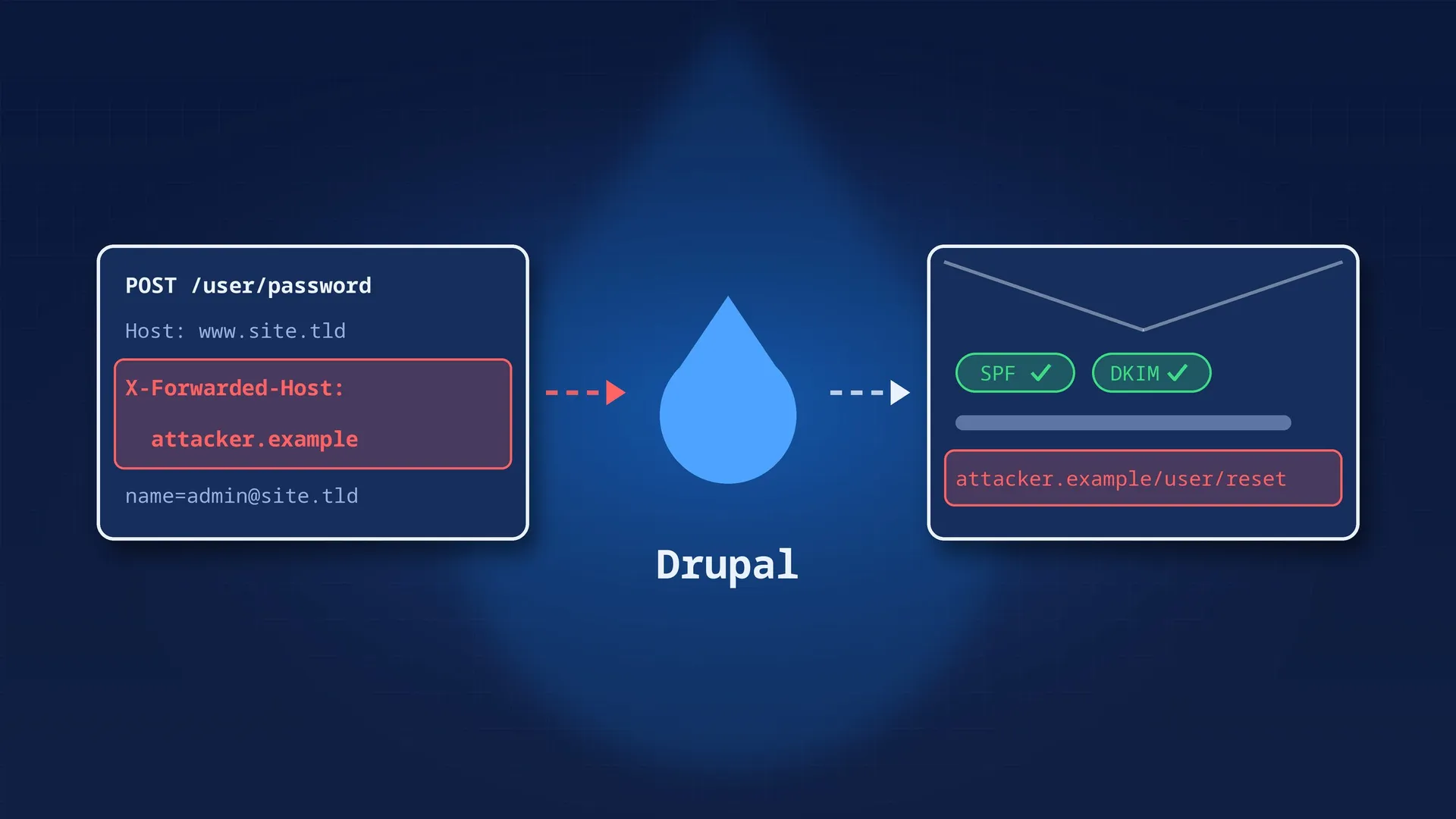
This week, on a production Drupal 11 site we maintain, an administrator received a “forgot password” email they had never asked for. It had the right sender and the site’s usual template, and it passed SPF and DKIM. Only one thing was off: the reset link didn’t point to the site. It pointed to an unknown domain.
The first assumption was the comforting one: a phishing email sent from outside, imitating the site. It was wrong. The site itself had sent that email, with a real, valid reset token. The attacker hadn’t hacked the server or the mail system. All they had done was pick the domain name Drupal would use to build the link.
This post explains how that works, how to reproduce it safely, and which settings actually block it. One of them is often presented as the fix, and on its own it isn’t enough.
The /user/password form only asks for a username or an email address. There is no field to slip a link into, and the attacker didn’t exploit any flaw in the form. They typed the victim’s address, like anyone would.
The link’s domain doesn’t come from what’s typed into the form. It comes from the HTTP request itself.
The email template (user.mail.yml, password_reset key) contains the [user:one-time-login-url] token. The token is replaced with an absolute URL, generated like this in core:
// core/modules/user/user.module, Drupal 11.3 (user_pass_reset_url()).
// Moved to OneTimeAuthentication::generateOneTimeLoginUrl() in 11.4.
return Url::fromRoute('user.reset', [
  'uid' => $account->id(),
  'timestamp' => $timestamp,
  'hash' => user_pass_rehash($account, $timestamp),
], [
  'absolute' => TRUE,
  // ...
]);
An absolute URL needs a domain. That domain doesn’t come from any configuration: Drupal takes it from the current request, through Symfony’s Request::getHost(). Simplified, getHost() does this:
// vendor/symfony/http-foundation/Request.php
if ($this->isFromTrustedProxy() && $host = $this->getTrustedValues(self::HEADER_X_FORWARDED_HOST)) {
  $host = $host[0];           // 1. Request from a trusted proxy: X-Forwarded-Host.
}
else {
  $host = $this->headers->get('HOST');  // 2. Otherwise: the Host header.
}
// 3. If trusted hosts are defined, $host must match one of them,
//    otherwise an exception is thrown.
The Host and X-Forwarded-Host headers are both sent by the client. If nothing checks them, the client chooses the domain of the links Drupal generates, including the one in the reset email.
The site’s settings.php combined two conditions.
1. trusted_host_patterns wasn’t defined in production. It only appeared in a comment, and in the local settings.ddev.php with the value ['.*']. Drupal accepted any domain.
Drupal does report this on the status report page (/admin/reports/status), as an error, not just a warning:
Trusted Host Settings: Not enabled. The trusted_host_patterns setting is not configured in settings.php. This can lead to security vulnerabilities.
It’s one of the checks in our list of signs of a poorly maintained site, and that red line had been there for years.
2. The list of trusted proxies contained… the caller itself.
$settings['reverse_proxy'] = TRUE;
$settings['reverse_proxy_addresses'] = [$_SERVER['REMOTE_ADDR']];
You’ll find this line in many projects hosted behind a load balancer whose IP changes. It tells Drupal: “whichever IP is talking to me is a trusted proxy”. In other words, everyone is a trusted proxy. Symfony even offers the same thing with the literal value 'REMOTE_ADDR'.
And when reverse_proxy_trusted_headers isn’t set, Drupal trusts every proxy header by default, X-Forwarded-Host included. Core’s own comment says so:
// core/lib/Drupal/Core/StackMiddleware/ReverseProxyMiddleware.php
// Set the default value. This is the most relaxed setting possible and
// not recommended for production.
$trusted_header_set = Request::HEADER_X_FORWARDED_FOR | Request::HEADER_X_FORWARDED_HOST
| Request::HEADER_X_FORWARDED_PORT | Request::HEADER_X_FORWARDED_PROTO | Request::HEADER_FORWARDED;A single request is enough:
POST /user/password HTTP/1.1
Host: www.example.com
X-Forwarded-Host: attacker.example
Content-Type: application/x-www-form-urlencoded

name=admin@example.com&form_id=user_pass&...attacker.example as the domain, and sends a real email, from the real server, to the victim.https://attacker.example/user/reset/<uid>/<timestamp>/<hash>./user/reset/<uid>/<timestamp>/<hash> on the real site and logs in as the victim. On an administrator account, that means the whole back office.The token is valid for 24 hours by default (password_reset_timeout: 86400 in user.settings), and it only works once: its hash includes the account’s last login time, so it becomes invalid as soon as the victim logs in.
The email gets past every anti-phishing filter, because it really does come from the site’s domain. That’s what makes the attack effective.
curl. But they don’t look at the Host or X-Forwarded-Host headers, and an attacker driving a real browser (headless Chrome, for instance) gets past them. They slow down basic bots, they don’t protect against this flaw.X-Forwarded-For header is trusted too. The IP recorded in Drupal’s log can therefore be forged. Only the load balancer’s logs show the real source IP.Don’t replay the attack against production, especially if a security team is investigating it: you would muddy their traces and trigger a new alert.
Locally with DDEV, emails go to Mailpit and never leave the machine. To recreate the production conditions, temporarily comment out trusted_host_patterns = ['.*'] in settings.ddev.php. Then two tests are enough.
A test that sends no email: request a page with a forged domain and look for that domain in the absolute links of the HTML (canonical, og:url, hreflang).
curl -s -H 'X-Forwarded-Host: attacker.example' https://mysite.ddev.site/user/login \
  | grep -c 'attacker.example'
# Vulnerable: > 0. Fixed: 0, or a 400 response.
The email test: submit “forgot password” from a browser with an extension that adds the X-Forwarded-Host header, then open the email in Mailpit. On our project, the link we got pointed to https://attacker.example/user/reset/…, exactly like the email in production.
// settings.php, production only (see "Deployment pitfalls").

// 1. The allow list of domains served by this environment.
$settings['trusted_host_patterns'] = [
  '^www\.example\.com$',
  '^example\.com$',
];

// 2. Only the load balancer is a trusted proxy: its subnets,
//    not the caller's IP.
$settings['reverse_proxy'] = TRUE;
$settings['reverse_proxy_addresses'] = ['10.0.1.0/24', '10.0.2.0/24'];

// 3. Only trust the headers the load balancer writes itself.
$settings['reverse_proxy_trusted_headers'] =
  \Symfony\Component\HttpFoundation\Request::HEADER_X_FORWARDED_FOR |
  \Symfony\Component\HttpFoundation\Request::HEADER_X_FORWARDED_PROTO |
\Symfony\Component\HttpFoundation\Request::HEADER_X_FORWARDED_PORT;Point 2 is often presented as the fix: “only trust the load balancer”. On its own, it isn’t enough. The attacker doesn’t talk to the Drupal server directly, they go through the load balancer like everyone else. An AWS Application Load Balancer handles X-Forwarded-For, X-Forwarded-Proto and X-Forwarded-Port, but not X-Forwarded-Host: the attacker’s header arrives untouched. The request really does come from a trusted proxy, so Drupal believes the header.
| Setting | Blocks the attack on its own? |
|---|---|
trusted_host_patterns |
Yes. getHost() validates the domain, whether it comes from Host or X-Forwarded-Host. An unknown domain gets a 400 response. |
reverse_proxy_trusted_headers without X_FORWARDED_HOST |
Partly. X-Forwarded-Host is ignored, but a forged Host is still accepted if the load balancer lets it through to Drupal. |
reverse_proxy_addresses limited to the load balancer |
No, when the attack goes through the load balancer. It only helps if the server can also be reached directly. |
The real fix is trusted_host_patterns. The other two settings shrink the attack surface, and they make the IP recorded in the logs trustworthy.
With the fix in place, the same request gets a 400 response with the message The provided host name is not valid for this server., and no email is sent.
Turning on trusted_host_patterns can take a site down if you forget a domain. Before deploying, check the following:
Host that isn’t on the list (the target’s IP, for example), it gets a 400 response, the tasks go unhealthy and the orchestrator keeps replacing them. Check in the access logs which Host your health check sends, then allow it, or make the health check send an allowed domain.www, aliases, staging and pre-production domains, and those of any multisite. Always anchor the patterns with ^ and $ and escape the dots: an example.com pattern also matches example.com.attacker.example.settings.ddev.php, included at the end of settings.php, forces ['.*']. That’s intended locally, but if your production values are defined after that include, they will apply locally too. Put them in a per-environment file, or behind a condition on an environment variable.trusted_host_patterns on the command line (PHP_SAPI === 'cli'). For links generated by Drush (drush uli, emails sent by cron), pass the domain with --uri or set it in drush.yml.Host header of the POST /user/password.trusted_host_patterns is set in production, with anchored ^…$ patterns.reverse_proxy_addresses lists the load balancer’s subnets, never $_SERVER['REMOTE_ADDR'].reverse_proxy_trusted_headers is set, without HEADER_X_FORWARDED_HOST or HEADER_FORWARDED unless the proxy writes them itself.curl -H 'X-Forwarded-Host: attacker.example' returns a 400, or HTML without that domain.--uri).This setting takes a few lines, and Drupal has flagged it in red since Drupal 8. Here, leaving it out was enough for the site to send a perfectly authentic phishing email itself.